VMWare共享文件夹
经过之前在Windows上搭建samba server,然后在VMWare虚拟机中访问,存在一个很严重的问题是,当Windows的网络环境发生变化时,这个连接就比较容易断,同时通过systemd启动时也存在偶发没有连接上的问题。
针对上述问题,接下来采用VMWare原生支持的共享文件夹进行内容共享,同时该方式不用经过完整的网络协议栈,理论速率要比samba快不少。
VMWare配置
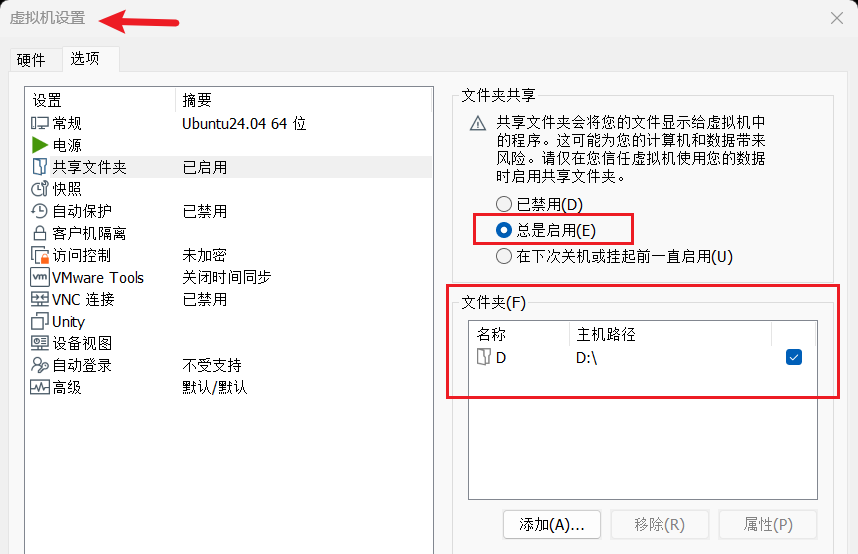
虚拟机配置
- 先安装
open-vm-tools,安装命令sudo apt install open-vm-tools,然后重启查看/mnt目录是否已经自动挂载上/mnt/hgfs/D。 - 如果没有则需要手动挂载,挂载命令是
sudo mkdir /mnt/hgfs
sudo mount -t fuse.vmhgfs-fuse .host:/ /mnt/hgfs -o allow_other
配置为 systemd 开机自动挂载
先确保挂载目录存在:
sudo mkdir -p /mnt/hgfs创建 /etc/systemd/system/mnt-hgfs.mount:
[Unit]
Description=VMware Shared Folders

[Mount]
What=.host:/
Where=/mnt/hgfs
Type=fuse.vmhgfs-fuse
Options=allow_other

[Install]
WantedBy=multi-user.target
重新加载 systemd 并启用 mount unit:
sudo systemctl daemon-reload
sudo systemctl start mnt-hgfs.mount
sudo systemctl enable mnt-hgfs.mount
这样会在开机时自动挂载。检查状态可使用:
systemctl status mnt-hgfs.mount
ls /mnt/hgfs/
D- 原文作者:生如夏花
- 原文链接:https://DBL2017.github.io/post/%E5%B7%A5%E5%85%B7%E4%BD%BF%E7%94%A8/vmware%E5%85%B1%E4%BA%AB%E6%96%87%E4%BB%B6%E5%A4%B9/
- 版权声明:本作品采用知识共享署名-非商业性使用-禁止演绎 4.0 国际许可协议进行许可,非商业转载请注明出处(作者,原文链接),商业转载请联系作者获得授权。